Welcome to APU from the IT Team! Our goal is to provide the APU Community with the best technology experience possible. Here is a list of items that may be helpful as you begin your role here at APU. This Guide is useful for Faculty/Staff/Adjuncts that just want to make sure they have all the links and forms they might need!
Important Forms
- Computer Request Form (Regular, Full Time Employee)
- Dialpad Request Form (Full Time Employee)
- Equipment Request Form
- PeopleSoft Request Form
- Additional Forms
Important Websites
-
home.apu.edu (Our University Portal/Dashboard)
-
Click “Sign In”
-
Login with your APU NetID & Password
-
If you have not gotten an email to set/reset a password, please email [email protected] and provide your 9-digit APU ID number (Provided by HR)
-
-
Once you are logged in, you will be able to:
-
Update Contact Info
-
Access Gmail & Canvas
-
Submit a Work Order
-
-
-
inside.apu.edu
-
This is APU’s internal portal for APU full-time employees, designed to be your central hub for employee resources as you support students and collaborate across the university.
-
Here you can:
-
Access forms, policies, resources, and training tools using the menu or search feature.
-
-
-
hrtotalaccess.apu.edu (Tons of Resources for Employees)
-
Here you are able to:
-
Search for Employees
-
Find Employee’s Extensions
-
Find Links & Forms
-
View Policies & Find Other Resources Provided by HR
-
-
-
timekeeping.apu.edu (Timecards)
-
Email [email protected] with Timecard questions or for additional support!
-
-
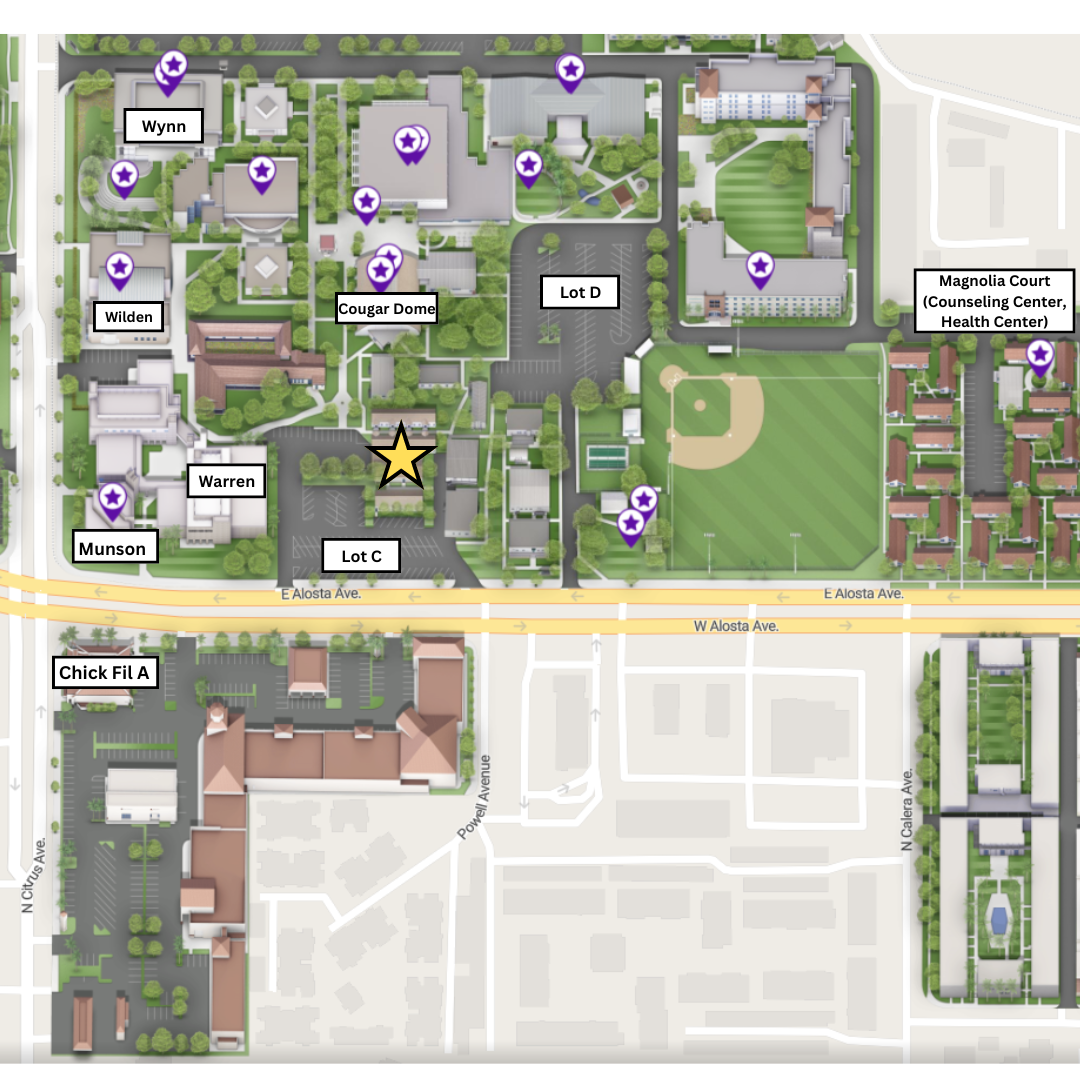
map.apu.edu
-
APU’s interactive campus map, designed to help you navigate the university’s locations and facilities.
- View detailed maps of campus buildings and surrounding areas
- Search for specific buildings, departments, or points of interest
- Explore campus layouts to better understand where services and resources are located
- It’s especially useful for quickly finding where you need to go, whether you're on campus or planning ahead.
-
FAQ’s
-
-
Fortinet VPN (Working Remote)
-
Microsoft Applications are only available on APU-Issued Computers (Not for personal devices)
-
SPSS
-
-
Facilities Key Requests (Please ask your supervisor as this may not be necessary)
-
APU Mobile Features:
-
News
-
Campus Map
-
Virtual ID Card
-
Trolley Tracker
-
Campus Dining
-
Course Catalog
-
For Full Time & Adjunct Faculty
Canvas is APU’s official learning management system (LMS). See below for some helpful links to get you started!
If you have any Canvas questions, feel free to email [email protected] for additional support!
How to Reach the IT Support Center!
Phone: (626) 815-5050
-
Live Phone Support M-F 8am-5pm
-
Please use the IT ChatBot at support.apu.edu outside of our business hours!
Email: [email protected]
Website: support.apu.edu
-
Helpful Articles & Guides
In Person:
-
Please email us at [email protected] for our current hours as it may vary from Semester to Semester
-
Typically we are open M-F from 8am-5pm for Walk In
-
-
We are located on East Campus in Building 5 near Parking Lot C